


For phone Android Users using Postimages free image hosting/image upload.Originally Posted by BelfastAndy

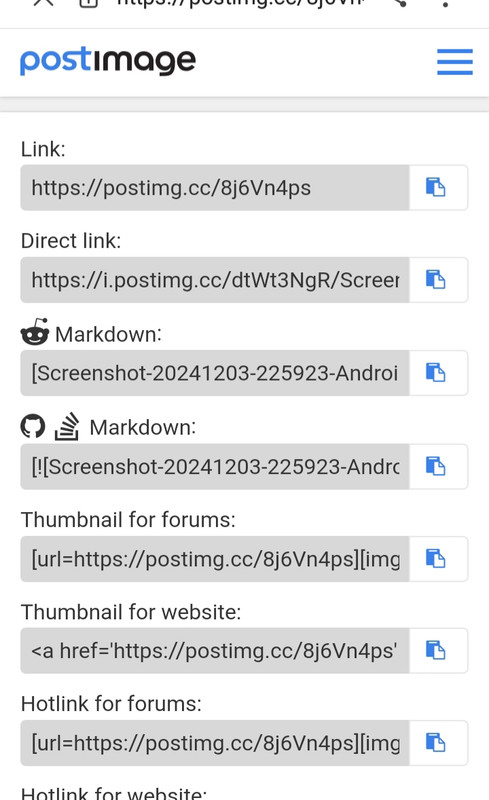
Tap on Choose images.
Pick picture from mobile pic File when prompted.
Tap on top right 'Done' button on pics menu to download chosen pic.
Picture will load (eventually) & pop up.
Scroll down to highlight 7th down 'hotlink to forum' & tap copy.
Then paste pic code into Mad message box with your post.
*Remember to delete all characters in code before first [img] & also after last [img] on the pics code when placing into the Mad message box too !
Ping the Advance box (under Post Quick reply) to check pic & message all ok - then submit.👍
**Probably best to upload pic code onto your phone Memo drafting page & then delete pics unnecessary characters within code.
Then add your message & then copy & paste all into Mads message box.

|
| + Visit Leeds United FC Mad for Latest News, Transfer Gossip, Fixtures and Match Results |
Results 1 to 8 of 8
Thread: Posting pictures
Threaded View
-
04-12-2024, 11:36 AM #4
 Hall Of Fame
- Join Date
- Oct 2010
- Posts
- 1,931



 Reply With Quote
Forum Info
Footymad Forums offer you the chance to interact and discuss all things football with fellow fans from around the world, and share your views on footballing issues from the latest, breaking transfer rumours to the state of the game at international level and everything in between.
Whether your team is battling it out for the Premier League title or struggling for League survival, there's a forum for you!
Gooners, Mackems, Tractor Boys - you're all welcome, please just remember to respect the opinions of others.
Click here for a full list of the hundreds of forums available to you
The forums are free to join, although you must play fair and abide by the rules explained here, otherwise your ability to post may be temporarily or permanently revoked.
So what are you waiting for? Register now and join the debate!
(these forums are not actively moderated, so if you wish to report any comment made by another member please report it.)
